Kubernetes SSL Certificate Issue: “certificate resource is not owned by this ingress.
Lösung für den cert-manager-Fehler certificate resource is not owned by this ingress beim Aktualisieren von Zertifikaten.
Kubernetes SSL Certificate Issue: “certificate resource is not owned by this ingress. refusing to update non-owned certificate resource for ingress”
Problem:
This article is for everyone who has this problem:
“certificate resource is not owned by this ingress. refusing to update non-owned certificate resource for ingress”
To show the complete log:
I0125 14:05:06.690930 1 sync.go:178] cert-manager/controller/ingress-shim "msg"="certificate resource is not owned by this ingress. refusing to update non-owned certificate resource for ingress" "related_resource_kind"="Certificate" "related_resource_name"="ingress-cert" "related_resource_namespace"="frontends" "related_resource_version"="v1" "resource_kind"="Ingress" "resource_name"="expose-portal-user" "resource_namespace"="frontends" "resource_version"="v1beta1"
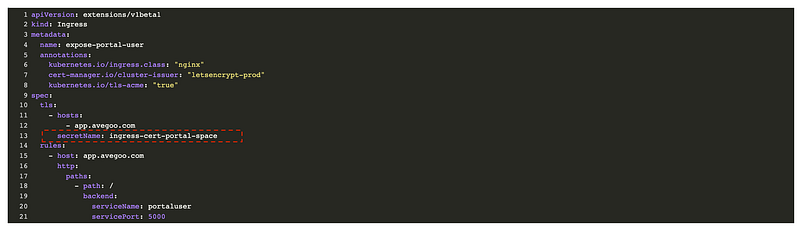
This accused while using the following yml:
apiVersion: extensions/v1beta1
kind: Ingress
metadata:
 name: expose-portal-user
 annotations:
 kubernetes.io/ingress.class: “nginx”
 cert-manager.io/cluster-issuer: “letsencrypt-prod”
 kubernetes.io/tls-acme: “true”
spec:
 tls:
 — hosts:
 — app.example.com
 secretName: ingress-cert
 rules:
 — host: app.example.com
 http:
 paths:
 — path: /
 backend:
 serviceName: portaluser
 servicePort: 5000
Solution:
The problem was that the ingress balancer was using an certificate secret, which was previously used by another resource. In other word we are using the same secretName for different balancer. This can cause issues when the cert manager want to create a new one with the same name.
Therefore my solution: Change the secretName under the tls settings of your yml file. I changed the name to the following:
With the different secretName the cert manager didn’t had any more problems and the issuing of the certificate with lets encrypt worked well. All my communications are SSL encrypt.
I hope the article helped. Happy coding!