Kubernetes Test Cert Manager Creating Let’s Encrypt Certificate

This article is for people who are having troubles / issues with issuing certificates on a Kubernetes cluster. Before we start we should check the name of our certificate issuer. Do do so use:
$ kubectl get issuer
$ kubectl get clusterissuer

For more details you can also use “$ kubectl describe clusterissuer letsencrypt-prod”. Here we can see that letsencrypt-prod is our cluster issuer for certificates. In the next step we need to create a temp file for the yaml of the certificate. Therefore execute the following command. Please keep in mind to replace dnsNames and issuerRef in case you have a different setup.
$ cat <<EOF > test-certificate.yaml
apiVersion: cert-manager.io/v1alpha2
kind: Certificate
metadata:
namespace: default
name: hello-certs
spec:
secretName: hello-certs
issuerRef:
name: letsencrypt-prod
kind: ClusterIssuer
dnsNames:
- servicetestabc.avegoo.com
EOF
After this we will now use the created file test-certificate.yaml and create the actual certificate with it. For this execute the following:
$ kubectl apply -f test-certificate.yaml

If the command was successful everything should be fine. But mostly something goes wrong and therefore we now have to check the status. For this use the following:
$ kubectl describe certificate
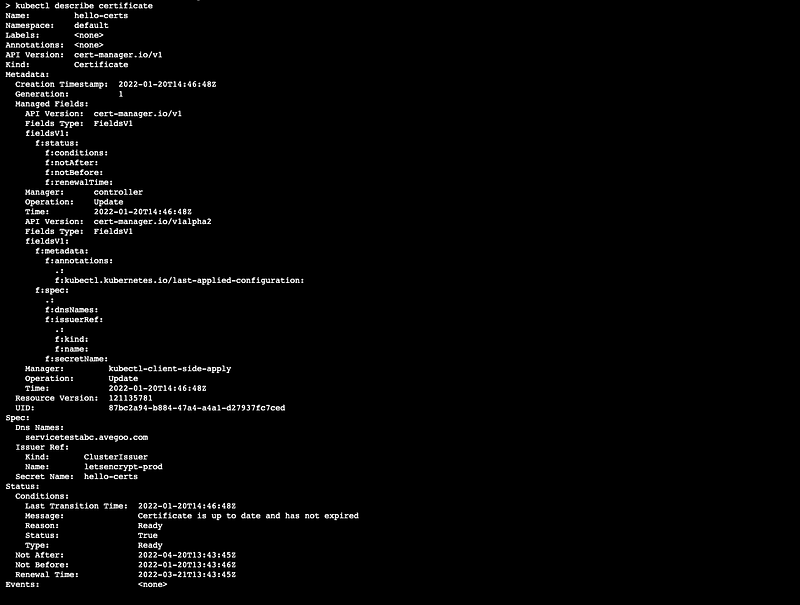
We can see everything is fine here. If something is wrong there should be entities listed on Events. To remove ever this we can use the following command:
$ kubectl delete -f test-resources.yaml
But there is a last resort looking for error. The option of checking the cert manager instance for their logs. Therefore use the following:
$ kubectl get pods --namespace cert-manager

After this we need to get the logs of the instance.
$ kubectl logs cert-manager-6d87886d5c-5f7jn --namespace cert-manager
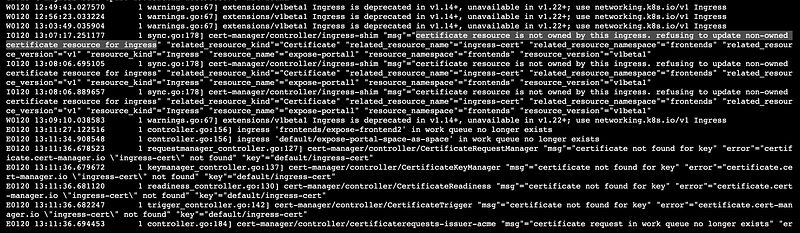
This command will produce a long list like this one:
Problem:
My issuer was:
“certificate resource is not owned by this ingress. refusing to update non-owned certificate resource for ingress”
Solution:
I used to ingress load blanchers for the same two workloads. Just deleted one and I was able to issue certificates like usual.
I hope it helped. Happy coding!
Important references:
[1] https://cert-manager.io/next-docs/installation/verify/
[2] https://www.thinktecture.com/en/kubernetes/ssl-certificates-with-cert-manager-in-kubernetes/