Cloud Run Problems with background tasks and CPU allocation.
If you have problems regarding background tasks/processes being not executed after an API Request.

If you have problems regarding background tasks/processes being not executed after an API Request.
Photo by Kasturi Roy on Unsplash
Problem:
This article is the right one for you. The general problem is that the Cloud Run Instances are usage-based. This means the instances are only getting CPU power allocated when the request is made. This can resolve problems of background tasks. For example, if you have a longer process running or if you just want to trigger something with your API call for later. Send email etc.
For this reason, you need to tell the CLoud Run instance to stop sharing CPU power and reserve a CPU only of your instance. Important here to mention is to set the minimum instance count to at least 1 in the Cloud Run settings. But this is only a secondary problem let's focus on the main one to disable CPU allocation. Source: https://cloud.google.com/run/docs/configuring/cpu-allocation
Solution
For this problem, we need to set the CPU to always allocate. Therefore use the Cloud Run settings:
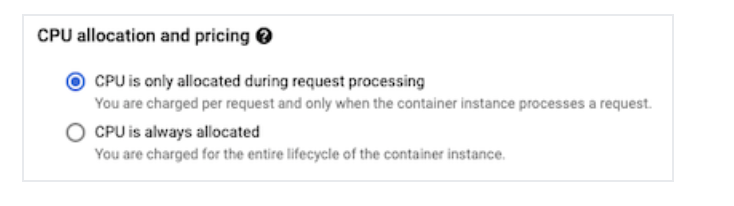
If we want to accomplish this in the build process thought a CI/CD Pipeline we can integrate the flag:
—- no-cpu-throttling
In the cloudbuild.yaml it would be:
steps:
 — name: gcr.io/cloud-builders/docker
 args:
 [
 "build",
 "-t",
 "gcr.io/$PROJECT_ID/app-backend:${SHORT_SHA}",
 "-t",
 "gcr.io/$PROJECT_ID/app-backend:latest",
 "."
 ]
 — name: "gcr.io/cloud-builders/docker"
 args: ["push", "gcr.io/$PROJECT_ID/app-backend"]
 — name: "gcr.io/cloud-builders/gcloud"
 args:
 [
 "run",
 "deploy",
 "app-backend",
 "--image",
 "gcr.io/$PROJECT_ID/app-backend:${SHORT_SHA}",
 "--region",
 "europe-west4",
 "--platform",
 "managed",
 "--allow-unauthenticated",
 "--memory",
 "4Gi",
 "— cpu",
 "4",
 "--no-cpu-throttling"
 ]
images:
 — "gcr.io/$PROJECT_ID/app-backend:$SHORT_SHA"
 — "gcr.io/$PROJECT_ID/app-backend:latest"
timeout: 3600s
options:
 logging: CLOUD_LOGGING_ONLY
I hope it helped and Happy Coding.