Raspberry pi python NEO 6M GPS module
Python script for the NEO-6M GPS module on the Raspberry Pi
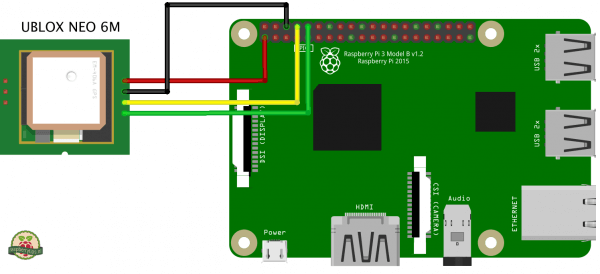
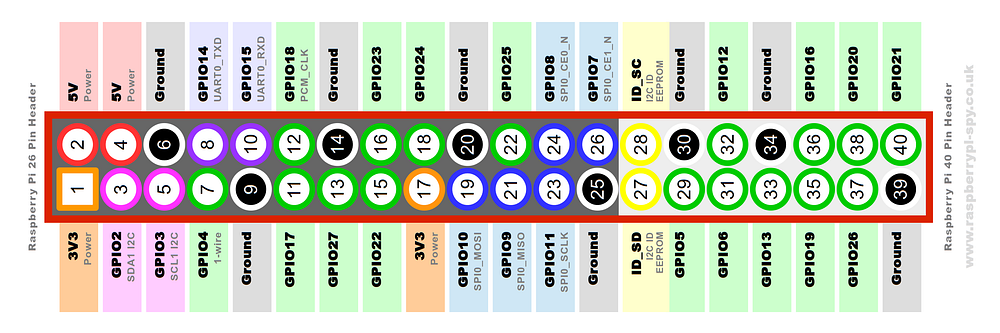
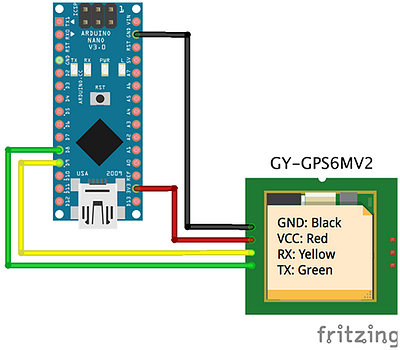
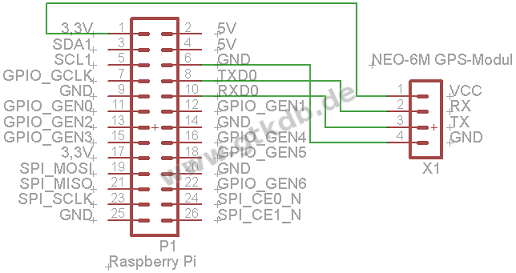
The identification of the current location with longitude, latitude and altitude is implemented through the NEO-6M GPS module. This Component allows us via the connecting schema presented in Figure 3.1 to access the Geographic information by reading the serial interface on rx and tx. For this Communication to work the dependencies pynmea2, gpsd, gpsd-clients, python-gps and minicom need to be installed with the python pip package manager. Also, the configuration „/boot/cmdline.txt“ of the Raspberry Pi has to be changed. The line „console=ttyAMA0,115200“ won’t be used anymore and this have to be commented out. With the default configuration of the module demonstrated in figure 8, which has to be added to the „/boot/config.txt“ file of the pi, the necessary baud rate and frequency is automatically added on the boot up.
dtparam=spi=on
dtoverlay=pi3-disable-bt
core_freq=250
enable_uart=1
force_turbo=1
init_uart_baud=9600
The connection to the NEO-6M GPS component can be testet with the Terminal prompt „cgps -s“ or with the visualization of the Data flow through „cat /dev/ttyAMA0“. With this setup the communication of the Module can be implemented with only a few line of python code presented in Figure 16.
import os, time, threading
from gps import *
from time import *
class GpsPoller(threading.Thread):
def __init__(self):
threading.Thread.__init__(self)
global gpsd #bring it in scope
gpsd = gps(mode=WATCH_ENABLE) #starting the stream of info
self.current_value = None
self.running = True #setting the thread running to true
def run(self):
global gpsd
while gpsp.running:
gpsd.next() #this will continue to loop and grab EACH set of gpsd info to clear the buffer
if __name__ == ‘__main__’:
gpsp = GpsPoller() # create the thread
gpsp.start() # start it up
print(gpsd.fix.latitude)
If this instructions didn’t explained the process of the necessary configuration for the GPS NEO-6M Module not detailed enough, there is also a specific and accurate documentation in the Github repository https://github.com/FranzTscharf/Python-NEO-6M-GPS-Raspberry-Pi.